Progressive
- 4.6
- Rating
- 10.00M
- Installs
- Free
- Price

 Analysis by App-foxy
I spend a lot of time judging finance apps by one simple question: do they make an important task easier when I am busy, stressed, or away from my computer? Progressive is built around that situation. It is the mobile app from Progressive Insurance, a free finance app that puts insurance-related tasks into a phone-based workflow instead of making me depend entirely on a desktop browser, a phone call, or paperwork.
That focus matters because insurance is rarely something people want to explore for fun. Most of us open an insurance app when we need to check something quickly, handle a payment, review a policy detail, or deal with a vehicle-related problem. In my experience, the value of Progressive is less about adding excitement and more about reducing the number of steps between a question and an answer.
The app has been available since April 20, 2010, and its current version is 3.138. Progressive Insurance is the developer, and the app is rated for Everyone. It runs on Android 8.0 or later, so people using an older phone should check compatibility before planning around it. The broad audience is reflected in its reach: it has passed ten million installs and holds a 4.6 average from roughly two hundred forty thousand ratings.
You May Also Like

 Google Keep - Notes and lists
Google Keep’s Quiet Growth Shows the Appeal of Simpler Notes
As mobile work gets busier, Google Keep keeps winning a simple contest: capture a thought quickly, find it later, and get on with the day.

 Blood Strike: 2.5 Anniversary
Blood Strike’s Loadouts Turn Every Drop Into a Tactical Gamble
A close look at Blood Strike’s custom loadouts: how fast access to signature weapons reshapes its battle royale rhythm, rewards preparation, and narrows the gap between fights.

 Pandora - Music & Podcasts
Pandora’s Music Is Easy to Start, but Harder to Recover
Pandora’s strength is its low-effort path from a seed to a station. Its weak spot is how much confidence it asks you to place in connection, setup, and quiet recovery.

 8 Ball Pool
 Is Built on Rivalries, Rematches, and Routine
A close look at the rivalries, rematches, shared routines, and unanswered safety questions that turn a quick pool match into a persistent mobile community.

 Samsung Music
’s Quiet Strength Is Playing What You Already Own
Its reach comes less from spectacle than from dependable access to a personal library. That simplicity is both the app’s strongest retention engine and its ceiling.

 AccuWeather: Weather Radar
AccuWeather Review: A Quick, Clear Forecast for Everyday Decisions
For everyday plans, the best forecast is the one you can understand quickly. AccuWeather makes rain timing, radar, and local conditions easy to act on, with a few trade-offs.
More From Our News Desk



How the free app earns its place on your phone
I see the free download as most useful when it turns a future insurance task into something you can handle without hunting for paperwork or deciding where to start. Before relying on any insurer’s app, I’d check that I can sign in and know when I would switch from a quick mobile task to a call or a larger screen. That practical distinction leads into what makes Progressive’s focused approach worthwhile.
Free access changes the value calculation
The most important cost detail is straightforward: Progressive is free to download. That makes the initial decision easy for existing Progressive customers, because there is no separate app purchase to justify and no paid entry tier to weigh against occasional use. You can treat it as a practical account tool rather than another subscription competing for space in your budget.
That does not mean every insurance-related cost disappears. The app is a way to interact with Progressive Insurance, not a promise that an insurance policy itself is free. I find this distinction important because a free app can still lead to paid services or policy payments. The useful question is therefore not “will the app save me from insurance costs?” but “will it save me enough time and effort to be worth using?”
For a Progressive customer, the answer is often yes. Even if I only need the app occasionally, having a dedicated place for insurance tasks is more convenient than searching through old emails, opening a browser, or trying to remember which customer-service route handles a particular issue. The free price removes the risk of paying for an app I might use only during a stressful moment.
What the app is really for
Progressive presents insurance as something that can be bought and used from almost anywhere, and the practical appeal is that the phone becomes the starting point for those interactions. I would think of it as a customer-service and policy-management companion, not as a general personal-finance dashboard. It is specific to Progressive rather than a tool for comparing every insurer, tracking a household budget, or organizing unrelated financial accounts.
That narrow purpose is a strength when your insurance is already with Progressive. The app does not need to teach you how to manage an entire financial life; it needs to help you deal with one insurer without unnecessary friction. The trade-off is equally clear: if you want a neutral marketplace, a multi-provider comparison tool, or one place to combine several insurance companies, this is not the right kind of app.
New customers may also see value in having a mobile route into Progressive’s insurance process. Still, I would not choose an insurer solely because its app is free or convenient. The policy, coverage, service experience, and total cost matter more than the software. The app can improve how you interact with Progressive, but it cannot turn an unsuitable policy into a suitable one.
Everyday use: the moments when convenience matters
Imagine leaving home for a trip and realizing that you want to check an insurance detail before driving. Without a dedicated app, you might search for a document, switch between messages, or wait until you have access to a computer. With Progressive installed and your account ready, the phone gives you a more direct place to begin. That is the kind of small convenience that becomes meaningful when you are standing beside a car, packing for travel, or handling several errands at once.
Another realistic situation is a minor incident in a car park. You may be dealing with another driver, trying to stay calm, and deciding what information you need next. An insurance app cannot remove the stress of the event, but having your insurer’s mobile channel close at hand can make the administrative side feel less scattered. I would still prioritize safety and any urgent assistance first; the app is a support tool, not a substitute for emergency services or careful judgment.
The same logic applies when you are away from your usual desk. A browser can do many of the same things, but a purpose-built app is easier to reach when your phone is already in your hand. That convenience is especially useful for people who rarely remember passwords, policy details, or customer-service paths without some kind of account shortcut.
Useful habits before you actually need it
My first practical tip is to install and sign in before a problem occurs. Insurance tools are most valuable when the user is prepared, not when they are trying to create an account while dealing with an incident. Take a quiet moment to make sure you can access the account and understand where the important areas are. That turns the app from a download you hope will help into a tool you already know how to use.
My second tip is to keep your contact and vehicle information current wherever the app allows it. Mobile convenience depends on the account being accurate. If you change vehicles, move, or update another important detail, delaying the update can create confusion later. I would use the app as a prompt to review information periodically, while still reading policy documents carefully rather than assuming a quick screen tells the whole story.
A third useful habit is to distinguish a quick account task from a question that needs a person. Apps are excellent for straightforward actions and checking information, but insurance language can be complicated. If a coverage question affects a claim, a major purchase, or a change in your circumstances, I would not rely on a rushed interpretation of a mobile screen. Use the app to get oriented, then contact Progressive when the situation calls for a precise explanation.
Where Progressive compares well with ordinary alternatives
The usual alternatives are a desktop browser, saved documents, email, or a phone conversation with an insurer. A browser may be better when I need to compare several pages of policy wording or work on a larger screen. Paper documents can be useful when a phone battery is low or internet access is inconvenient. A phone call remains valuable when the request is unusual or emotionally difficult.
Progressive’s advantage is the middle ground: more focused than searching through documents, quicker to reach than a call, and more portable than a desktop session. That makes it a sensible companion for routine insurance management. It is not automatically better in every situation. A person who prefers speaking with an agent, rarely uses mobile apps, or needs detailed side-by-side policy analysis may find the traditional alternatives more comfortable and more reliable.
I also would not confuse a strong app experience with the broadest insurance choice. A comparison service may be better for someone shopping across multiple providers, while Progressive is more useful after you have chosen Progressive or are seriously considering it. The app’s value grows with your relationship to this particular insurer; it does not attempt to be an independent advisor.
Small friction points worth considering
The biggest limitation is the app’s provider-specific design. If your household uses different insurers for different vehicles or types of coverage, Progressive will not become a universal control center. You may still need separate apps, websites, or documents. That can make it less attractive for people who want one consolidated view of all their financial and insurance information.
There is also a difference between convenience and clarity. A mobile interface can help me reach information quickly, but a small screen is not always the best place to study exclusions, conditions, or complicated coverage language. I would use the app for access and organization, then move to a larger screen or a conversation with Progressive when the decision has serious financial consequences.
Another trade-off is occasional use. If you are comfortable with your paper documents and never need mobile access, the free download may not change your routine much. The app earns its place through preparedness and speed, not through constant daily engagement. That is perfectly acceptable for an insurance tool, but it means its value will feel different from that of a banking or budgeting app you open every day.
Finally, compatibility matters. The minimum supported Android release is 8.0, which covers many devices but not every older phone. I would check the operating system before relying on the app for an upcoming trip or a policy task. If your device is incompatible, the web or phone alternatives become more important, and the app cannot serve as your only access route.
Who will get the most value
I think Progressive is best for people who already use Progressive Insurance and want a convenient mobile way to stay connected with their policy. It is also a reasonable choice for customers who travel often, manage insurance while away from home, or simply prefer handling routine tasks from a phone. The free price makes it easy to try without turning the decision into a financial commitment.
It can also suit less technical users who want a single, recognizable place for their insurer rather than a collection of browser bookmarks and saved messages. The Everyone age rating supports a broad audience, although the most important factor is still whether the account holder is comfortable using a smartphone for financial information.
I would be more cautious if you are comparing insurers from scratch. In that situation, start with coverage needs and total policy cost, then judge Progressive’s service and app as part of the overall choice. Someone who wants a multi-company dashboard, detailed financial planning, or a fully human-led process may be better served by another type of tool or by direct contact with an insurance professional.
My verdict on installing Progressive
After looking at what it offers and where it fits, I see Progressive as a practical free companion rather than a complete finance solution. Its strongest quality is focus: it gives Progressive customers a mobile starting point for insurance interactions when a computer, filing cabinet, or phone queue would be less convenient. The large user base and 4.6 average suggest that many people find that approach useful, though popularity alone should not replace your own needs.
My recommendation is simple: install it if Progressive is your insurer or a serious option you are considering, especially if you value quick mobile access. Prepare your account before you need it, keep your information organized, and use a larger screen or human support for complicated coverage decisions. The free access makes trying it low risk, but the app’s real value comes from saving time during the moments when insurance paperwork is least welcome.
If you want a neutral comparison across companies, a consolidated household-finance view, or detailed policy research on a small phone screen, I would skip it as your main tool. For everyone else, Progressive is a focused insurance app from Progressive Insurance that does one job sensibly: it brings your relationship with that insurer closer to the situations where you actually need it.
FAQs for Progressive
01What platforms is the Progressive app available on?
The Progressive app is available for both Android and iOS devices. You can download it from the Google Play Store for Android or the Apple App Store for iOS. The app is designed to provide a seamless user experience across different devices, making it easy to manage your insurance needs on the go.
02How do I manage my insurance policies using the Progressive app?
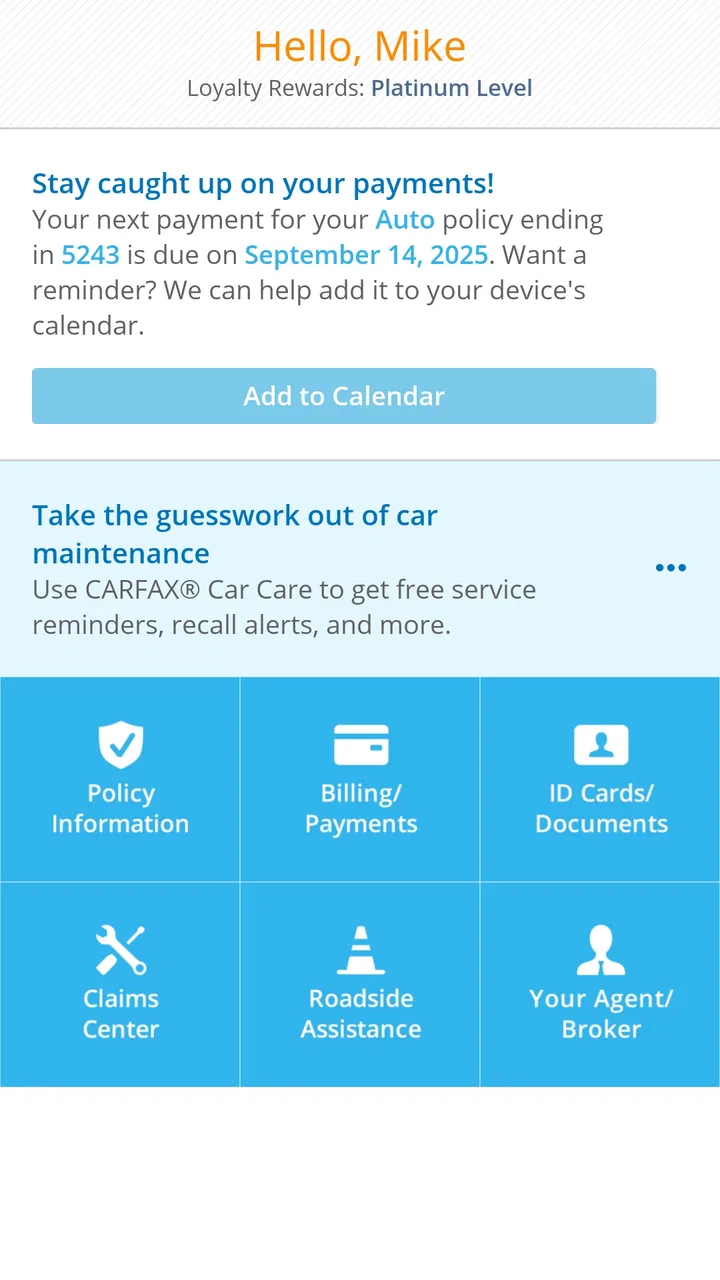
The Progressive app allows you to manage your insurance policies with ease. You can view your policy details, make payments, and update your information directly from the app. Additionally, you can file claims, track their progress, and access your insurance ID cards digitally, ensuring that all your insurance needs are at your fingertips.
03Is there a cost associated with using the Progressive app?
The Progressive app is free to download and use for all Progressive customers. There are no hidden fees or charges for accessing your policy information or utilizing the app's features. However, standard data charges may apply depending on your mobile carrier's plan when using the app outside of a Wi-Fi network.
04Can I use the Progressive app to file a claim?
Yes, the Progressive app provides a convenient way to file a claim. You can start a new claim directly from the app, providing details, uploading photos, and tracking the status of your claim in real-time. This functionality streamlines the claims process, making it more efficient and reducing the need for lengthy phone calls.
05What security measures does the Progressive app have in place?
The Progressive app uses advanced security measures to protect your personal and financial information. These include encryption, secure login with biometrics, and regular security updates. The app is designed to ensure that your data remains confidential and secure, giving you peace of mind while managing your insurance policies.
Pros
- User-friendly interface for easy navigation.
- Seamless integration with other apps.
- Customizable notifications and alerts.
- Lightweight
- requires minimal storage space.
- Regular updates with new features.
Cons
- Limited offline functionality.
- Occasional connectivity issues.
- Some features locked behind paywall.
- In-app purchases can be pricey.
- Ads can be intrusive at times.

Progressive
Gallery